 CryptoChain Blog

Introduction to AI-Powered Hardhat Plugins
In 2026, smart contract security remains a critical priority for Ethereum developers building on Layer 1 and Layer 2 networks. AI-powered Hardhat plugins now integrate directly into daily development workflows to detect vulnerabilities in real time during Solidity coding sessions. These tools extend traditional static analysis by leveraging machine learning models trained on millions of historical exploits and new attack patterns, enabling proactive fixes before any deployment occurs. Hardhat, the popular Ethereum development environment, serves as the foundation for these enhancements. By adding AI plugins, teams achieve faster internal audits without relying solely on external security firms, which often introduce delays and higher costs. This approach reduces common issues like reentrancy attacks, integer overflows, access control flaws, and denial-of-service vectors through automated, context-aware detection that evolves with the ecosystem.
Developers benefit from inline feedback in IDEs such as VS Code, where potential problems are highlighted as code is written. The result is shorter development cycles and higher confidence in contract logic. Throughout this guide we explore setup processes, workflow integration, tool comparisons, gas optimization strategies, attack simulations, pitfalls to avoid, and scaling recommendations for team environments in 2026.
Setting Up AI-Enhanced Hardhat Plugins
Begin by initializing a new Hardhat project if one does not already exist. Execute npx hardhat init in your project directory and select the TypeScript or JavaScript template based on team preference. Next, install the core AI plugin packages from the npm registry. Popular options include official integrations that embed AI scanning capabilities directly into the Hardhat task runner.
Install the primary package with: npm install --save-dev hardhat-ai-audit-plugin@latest. Update your hardhat.config.js or hardhat.config.ts file with the following detailed configuration block:
require("hardhat-ai-audit-plugin");

module.exports = {
  solidity: {
    version: "0.8.24",
    settings: { optimizer: { enabled: true, runs: 200 } }
  },
  aiAudit: {
    enabled: true,
    model: "2026-v2",
    apiEndpoint: "https://api.audit.example.com/v2",
    customDetectors: ["reentrancy-ai", "access-control-ml", "flashloan-pattern"],
    severityThreshold: "medium",
    reportFormat: "json+html"
  }
};
After saving the configuration, run npx hardhat compile to verify the plugin loads correctly. For troubleshooting common setup errors, ensure Node.js version 20 or higher is active and that firewall rules permit outbound connections to the AI model endpoint. Advanced users can also install companion packages for VS Code integration to receive real-time linting overlays.
Real-Time Detection Workflows
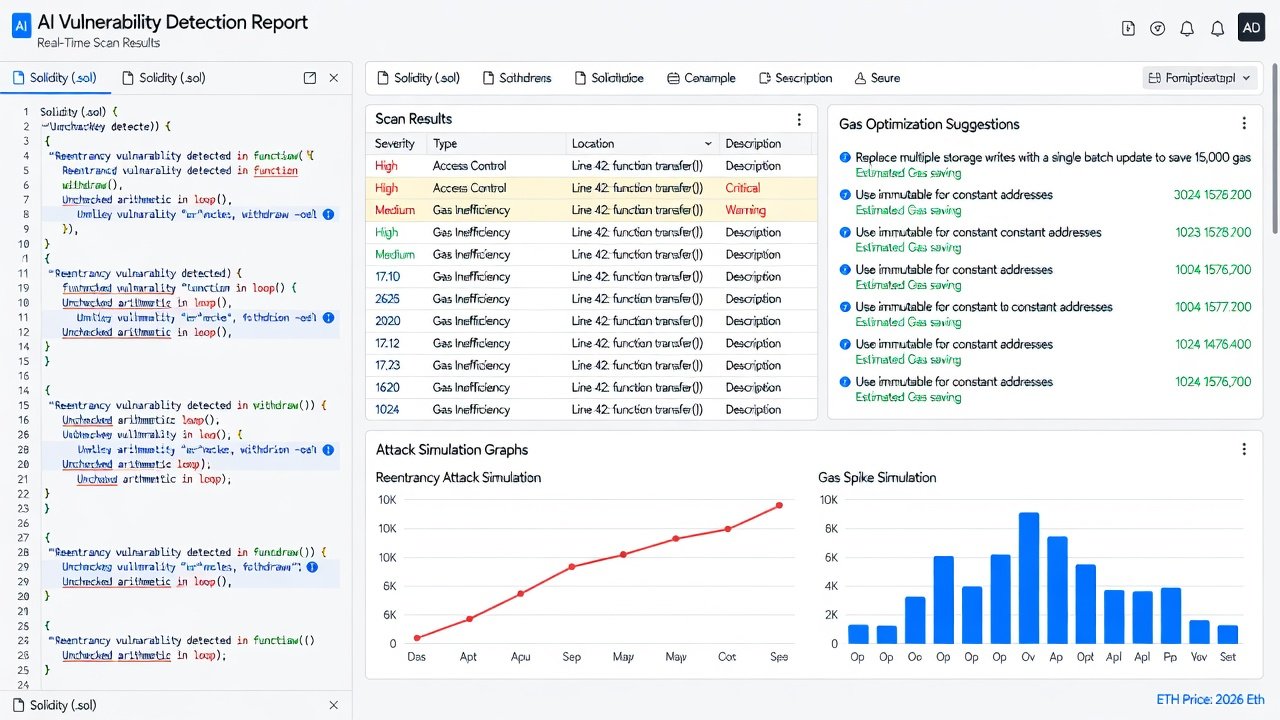
Once configured, the workflow runs automatically on file changes. On saving a .sol file, Hardhat triggers the AI scanner in the background. Results appear instantly in the terminal and as inline warnings within supported editors. For example, the plugin flags potential flash loan attacks by analyzing control flow graphs with neural networks trained on recent DeFi incidents. To customize detection rules, define new detectors inside a dedicated detectors/ folder. Here is a step-by-step process for building a custom AI detector:
- Create detectors/custom-reentrancy.js containing pattern-matching logic enhanced by vector embeddings from the AI model.
- Export a detector function that accepts contract AST and returns severity-ranked findings.
- Register the new detector path inside hardhat.config.js under the customDetectors array.
- Execute
npx hardhat ai-audit:scan --file contracts/MyContract.solto validate output. - Integrate the scan task into your CI pipeline using GitHub Actions for every pull request.
This produces detailed reports that include severity levels, line references, suggested remediation code, and confidence percentages. Teams often combine these outputs with existing test suites to create a continuous security feedback loop.
Comparing Top AI Audit Tools for Hardhat
Several tools stand out for 2026 workflows. The native Hardhat AI plugin leads for seamless IDE integration and low configuration overhead. Alternatives include Mythril-AI extensions and Slither augmented with ML modules. Hardhat excels in speed during iterative development loops, while other solutions provide broader on-chain simulation depth at the expense of setup complexity.
- Hardhat AI Plugin: Best for real-time IDE feedback, gas-aware suggestions, and native support for custom Solidity detectors; ideal for small to medium teams.
- Slither-ML: Strong for open-source custom rule writing and large-scale repository scanning but requires additional Python dependencies.
- Foundry-AI hybrids: Faster fuzzing execution yet less specialized in Solidity-specific AI pattern recognition compared with Hardhat-native options.
- Commercial platforms with Hardhat bridges: Offer enterprise dashboards and team collaboration features when open-source tooling proves insufficient.
Choose based on existing toolchain preferences and project scale. Most Solidity teams achieve the best results by starting inside the Hardhat ecosystem to minimize context switching and maintain consistent task definitions.
Gas Optimization Tips with AI Insights
AI plugins extend beyond security to analyze gas consumption patterns during compilation. They suggest concrete optimizations such as replacing repeated storage reads with cached memory variables or identifying inefficient conditional loops that can be refactored. Run npx hardhat ai-audit:gas-report --compare previous after each scan to receive prioritized recommendations ranked by potential savings. Common high-impact wins include declaring constants as immutable, batching external calls, and preferring uint256 over smaller integer types where storage packing is not beneficial. These AI-derived tips, validated against current mainnet conditions, help developers reduce deployment and execution costs while maintaining security posture.
Attack Simulation Examples
Simulate realistic attacks directly inside Hardhat using AI-guided fuzzing modules. Configure the plugin to auto-generate adversarial test cases based on detected weaknesses. An example script located in test/attack-sim.js demonstrates the approach:
const { expect } = require("chai");

describe("AI-Guided Attack Simulation", function () {
  it("detects and mitigates reentrancy under flash loan conditions", async function () {
    const attacker = await ethers.getContractFactory("MaliciousFlashLoan");
    const attackContract = await attacker.deploy();
    await attackContract.attack(targetContract.address);
    expect(await targetContract.balanceOf(attackContract.address)).to.equal(0);
  });
});
Execute the simulation with npx hardhat test --ai-simulate --network hardhat. The AI engine mutates inputs across hundreds of iterations to surface edge cases that manual test writing commonly misses. Additional simulations can target access control bypasses and oracle manipulation scenarios.
Common Pitfalls and How to Avoid Them
Many teams over-rely on default detector thresholds without tuning confidence levels, resulting in alert fatigue and ignored warnings. Always review AI confidence scores and cross-verify high-severity findings with manual code review or external auditors for contracts handling significant value. Another frequent issue involves neglecting regular plugin updates; AI models receive monthly retraining on newly disclosed vulnerabilities. Pin exact versions in package.json and schedule periodic dependency audits. Finally, avoid treating plugin output as a complete substitute for professional reviews. The most effective strategy combines automated scanning with human expertise and formal verification where appropriate.
Scaling for Team Deployments in 2026 Ethereum Environments
For larger organizations, deploy shared AI model endpoints behind internal proxies and enforce standardized plugin configurations through monorepo tooling such as Nx or Turborepo. Integrate scans into every stage of the CI/CD pipeline and maintain a centralized dashboard for tracking vulnerability trends across multiple repositories. Reference Hardhat documentation for advanced networking and caching setups. Align practices with Ethereum security best practices and consult Solidity language specifications when refining custom detectors. Regular training sessions for developers on interpreting AI reports further improve adoption and reduce false-positive handling time.
Conclusion
AI-powered Hardhat plugins represent a major advancement in Solidity development security for 2026. By embedding intelligent scanning into everyday workflows, teams catch issues earlier, optimize gas usage, and simulate attacks more effectively than ever before. Following the setup, customization, and scaling guidance outlined above positions projects for safer deployments on Ethereum mainnet and Layer 2 networks. Continued experimentation with custom detectors and integration into team processes will yield the greatest long-term benefits.
FAQ
How do AI plugins handle newly discovered attack vectors in 2026?
Models receive monthly retraining on public exploit datasets, and teams can fine-tune local instances using proprietary audit histories for domain-specific accuracy.
Can these tools fully replace professional security audits?
No. Automated plugins serve as an early detection layer and complement, rather than replace, third-party audits and formal verification for high-value contracts.
What Ethereum environments receive full support?
Native compatibility exists for mainnet forks, Sepolia and Holesky testnets, plus Layer 2 networks including Optimism, Arbitrum, and Base as of October 2026.
Are custom detectors easily shareable across teams?
Yes. Detectors can be packaged as private npm modules and version-controlled for consistent use across collaborative repositories and multiple projects.
How frequently should teams update plugin models?
Schedule updates at least once per month or immediately after major disclosed incidents to maintain coverage of the latest threat landscape.


No comments yet. Be the first!